GitHub Configuration Checklist for SOC 2 Compliance

Key Takeaways
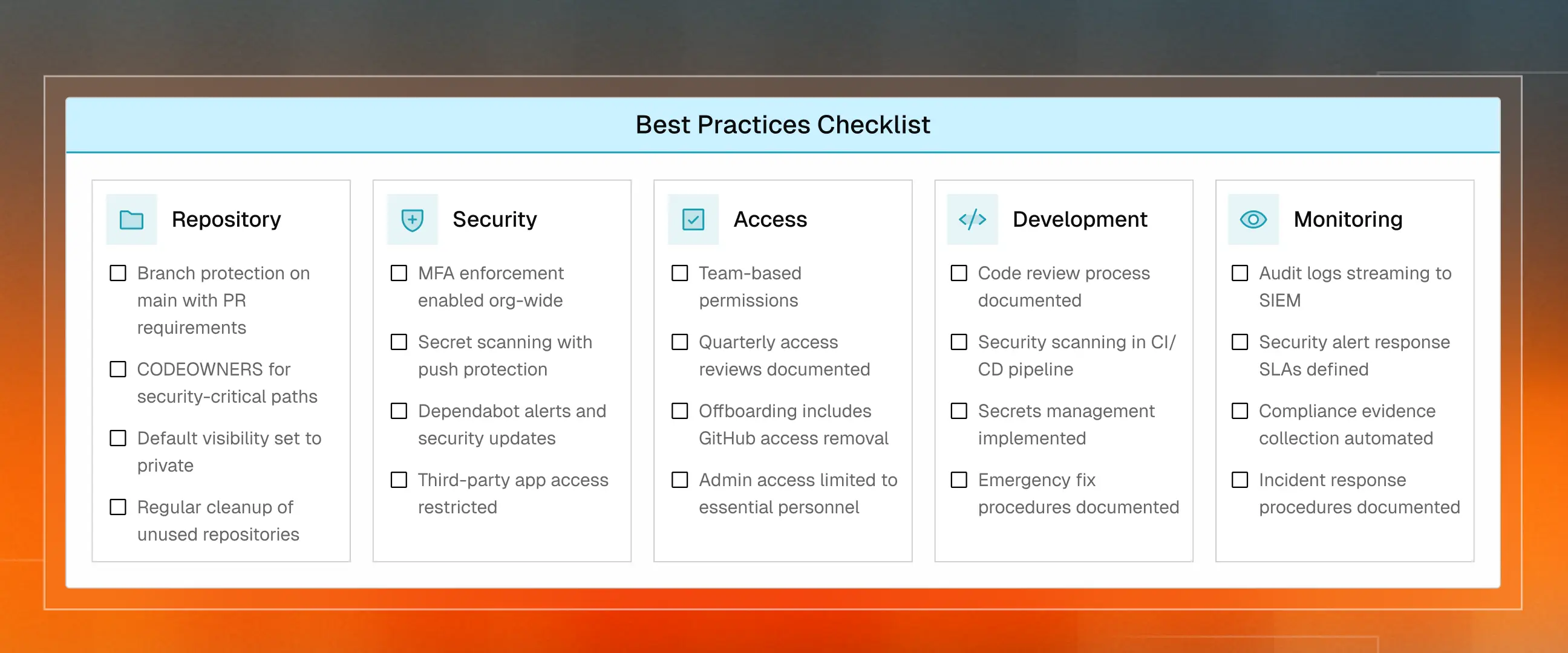
- GitHub SOC 2 compliance requires six configurations: branch protection with PR approvals, organization-wide MFA, CODEOWNERS for sensitive paths, Dependabot vulnerability scanning, secret scanning with push protection, and audit log streaming to external storage for one-year retention.
- These settings map directly to AICPA Trust Services Criteria: CC6.1 for access controls, CC8.1 for change management, CC3.2 for risk assessment and CC 7.1 for SIEM events.
- GitHub detected 39 million leaked secrets in 2024, underscoring the need for push protection to block credentials before they reach your repository.
- Audit logs must be streamed externally because GitHub retains them for only 90 days, and auditors require a full year of evidence.
- Team-based permissions with quarterly reviews replace individual access grants and simplify offboarding when employees leave.
- Third-party OAuth apps and GitHub Apps are supply chain risks that auditors increasingly ask about during reviews.
- What works for a 10-person startup breaks at 50 and again at 200, so integrate GitHub with your identity provider via SAML SSO to keep access in sync with HR
Your GitHub configuration is either helping or hindering your SOC 2 audit. There is no in-between. The difference comes down to six settings that take an afternoon to configure but save weeks of scrambling later.
Auditors focus on two things when reviewing your repositories: who can access your code and how changes are approved. Under the AICPA Trust Services Criteria, these fall under access controls (CC6) and change management (CC8). Get these right, and your GitHub becomes automated evidence instead of a compliance headache.
Table: SOC 2 Control Mapping against GitHub features
GitHub Configuration Requirements for SOC 2
These settings show up in every SOC 2 audit. Each one maps to a specific control in the AICPA framework. Configure them once, and your repository compliance is largely handled.
1. Branch Protection on Main
No direct pushes to production. Every change is submitted as a pull request with at least one approval.
Settings > Branches > Add branch protection rule:
- Require pull request reviews before merging
- Dismiss stale approvals when new commits are pushed
- Require status checks to pass before merging
- Restrict force pushes
One person writes code, another approves it. This separation of duties is exactly what NIST access control guidelines recommend. Find full setup in GitHub's branch protection docs.
2. Organization-Wide MFA
Everyone with code access requires two-factor authentication. No exceptions. Contractors and temporary contributors included.
Organization Settings > Authentication security > Require two-factor authentication.
GitHub removes anyone without MFA when you enable this. Check your member list first. This satisfies NIST authentication requirements that auditors reference.
3. CODEOWNERS File
CODEOWNERS defines who must approve changes to sensitive paths. Authentication code, infrastructure configs, CI/CD workflows.
Create .github/CODEOWNERS:
/src/auth/          @security-team
/terraform/         @platform-team
/.github/workflows/ @platform-team
Enable Require review from Code Owners in branch protection. Changes to critical paths now require the right approvals.
4. Dependabot Alerts
Your dependencies have vulnerabilities. Dependabot finds them and can auto-generate fix PRs.
Go to:
Organization Settings > Code security and analysis > Enable Dependabot alerts.
Also enable Dependabot security updates. The GitHub Advisory Database covers over 20,000 reviewed vulnerabilities. Set response SLAs: critical within 24 hours, high within a week.
5. Secret Scanning with Push Protection
GitHub detected 39 million leaked secrets in 2024. API keys, passwords, and tokens accidentally committed to repositories. To avoid getting your secrets leaked, go to:
Organization Settings > Code security and analysis > Enable secret scanning.
Also enable Push protection. This blocks secrets before they ever reach your repository. According to GitHub's docs, it catches credentials during the push and stops them immediately. Better than explaining to auditors why AWS keys are in your commit history.
6. Audit Log Streaming
GitHub retains audit logs for 90 days. SOC 2 auditors want a full year. Audit log streaming sends logs to external storage, where you control retention.
Enterprise Settings > Audit log > Log streaming.
GitHub streams natively to Splunk, Datadog, Azure Event Hubs, and AWS S3. This provides the evidence auditors need and lets you detect suspicious activity.
Repository Security Basics
Branch Protection Configuration
Branch protection rules enforce your workflow at the repository level. These four settings matter most.
- Require pull request reviews. Every change needs at least one other person to review it before merging. For sensitive paths, configure this to require reviews from designated CODEOWNERS.
- Dismiss stale reviews. When a developer pushes new commits after getting approval, they need fresh reviews. This prevents anyone from sneaking in unreviewed changes after the green light.
- Require status checks. Your CI/CD tests must pass before code can merge. This creates a quality gate that keeps broken or vulnerable code out of protected branches.
- Restrict force pushes. Force pushes can rewrite commit history and potentially hide unauthorized changes. Blocking them keeps your audit trail intact.
Access Control
- Use team-based permissions. Create teams aligned with your org structure. Assign permissions to teams, not individuals. When someone leaves, remove them from the team. Access disappears automatically.
- Run quarterly reviews. Every three months, audit who has access to what. Remove what is no longer needed. Document it. This follows NIST SP 800-53 account management guidelines. The IBM Cost of a Data Breach Report found breaches cost $4.88 million on average in 2024.
- Default to least privilege. Start with read-only. Escalate only when necessary. Limit admin access to two or three people. Per GitHub's docs, organization owners should be essential personnel only.
Code Security
- Enable secret scanning. Enable secret scanning organization-wide and establish a clear response process for alerts.
- Turn on push protection. This blocks secrets before they ever reach your repository. According to GitHub's docs, it catches credentials during the push and stops them immediately.
- Keep no secrets in code. Use GitHub Secrets or an external secret manager like Vault. Add pre-commit hooks to catch errors before they reach your repository.

Development Workflow Compliance
Pull Request Requirements
- Document your review standards. Write down what reviewers should check for, how quickly they should respond, and how to handle disagreements. Put it in a doc and link it in your README. Auditors want to see a documented process, not a perfect one.
- Make CI/CD checks required. Every pull request should run your test suite before it can be merged. Set this up in your branch protection rules so failed tests block the merge automatically.
- Plan for emergencies. Sometimes production is on fire, and you need to move fast. Document your emergency fix process ahead of time, and make sure you review any exceptions after the fact. Auditors accept this as long as it is documented.
Secrets Management
- Use external secret managers for production. AWS Secrets Manager, HashiCorp Vault, and Azure Key Vault all work. The rule is simple: never store credentials in code or config files.
- Use GitHub Secrets for CI/CD. Encrypted secrets work well for deployment keys and test credentials. Limit who can access them using environment protection rules.
- Set a 24-hour response SLA. When secret scanning alerts fire, rotate the exposed credentials immediately. Then, audit where they might have been used and determine how they were exposed in the first place.
Monitoring and Audit Logging
Audit Requirements
- Export logs to an external system. Configure audit log streaming so your logs are preserved even if someone compromises your GitHub access. Use webhooks or the API to send events to your SIEM or log storage.
- Monitor admin actions closely. Permission changes, repo deletions, and security setting modifications are high-risk events. Set up alerts for these in your monitoring system so you catch problems early.
- Track every access change. Every permission grant or revocation should be logged and reviewed as part of your quarterly access certification. Keep these logs for at least one year.
Security Monitoring
- Route Dependabot alerts to someone who acts on them. GitHub published over 2,000 CVE records in 2024, so vulnerability alerts will come. Define response SLAs so they do not pile up.
- Subscribe to security advisories. GitHub's security advisories give you early warning about vulnerabilities in GitHub itself or commonly used Actions.
- Audit third-party app access regularly. Check what OAuth apps and GitHub Apps have access to your org. Remove anything you are not actively using. These are supply chain risks that auditors increasingly ask about.
- Watch for failed authentication patterns. Monitor your audit logs for repeated failures or unusual access attempts. Route anything suspicious to your security team.
Scaling GitHub Compliance As Team Grows
What works for a 10-person startup breaks at 50. What works at 50 breaks at 200. Your GitHub structure needs to evolve with your team.
- Consider separate organizations for different environments. Splitting production and development into separate GitHub organizations creates clear security boundaries and simplifies your compliance scope. Auditors appreciate the clarity.
- Centralize your security policies. Use GitHub Enterprise security policies or automation to enforce consistent settings across all your organizations. Nobody should be able to create a repo without branch protection.
- Automate user provisioning. Integrate GitHub with your identity provider using SAML SSO so access mirrors your HR systems automatically. When someone leaves the company, their GitHub access should be removed the same day.
- Design team structures that scale. Map your GitHub teams to your org chart and use nested teams for inheritance. This makes quarterly access reviews much easier because you can validate team membership directly against HR records.
Why Manual GitHub Compliance Breaks
The initial GitHub setup is the easy part. The challenge comes later, when settings quietly drift, new repositories go live without branch protections, scheduled reviews get deprioritized, and someone connects an OAuth app that shouldn't have access.
Platforms like Delve connect to GitHub and run daily compliance checks. When something drifts, you find out immediately instead of during audit prep. AI-powered guidance tells your team how to fix issues without becoming compliance experts.
The goal: security that runs in the background while you build. GitHub compliance should not require a dedicated person. It should just work.
Key Takeaways
- GitHub SOC 2 compliance requires six configurations: branch protection with PR approvals, organization-wide MFA, CODEOWNERS for sensitive paths, Dependabot vulnerability scanning, secret scanning with push protection, and audit log streaming to external storage for one-year retention.
- These settings map directly to AICPA Trust Services Criteria: CC6.1 for access controls, CC8.1 for change management, CC3.2 for risk assessment and CC 7.1 for SIEM events.
- GitHub detected 39 million leaked secrets in 2024, underscoring the need for push protection to block credentials before they reach your repository.
- Audit logs must be streamed externally because GitHub retains them for only 90 days, and auditors require a full year of evidence.
- Team-based permissions with quarterly reviews replace individual access grants and simplify offboarding when employees leave.
- Third-party OAuth apps and GitHub Apps are supply chain risks that auditors increasingly ask about during reviews.
- What works for a 10-person startup breaks at 50 and again at 200, so integrate GitHub with your identity provider via SAML SSO to keep access in sync with HR
Your GitHub configuration is either helping or hindering your SOC 2 audit. There is no in-between. The difference comes down to six settings that take an afternoon to configure but save weeks of scrambling later.
Auditors focus on two things when reviewing your repositories: who can access your code and how changes are approved. Under the AICPA Trust Services Criteria, these fall under access controls (CC6) and change management (CC8). Get these right, and your GitHub becomes automated evidence instead of a compliance headache.
Table: SOC 2 Control Mapping against GitHub features
GitHub Configuration Requirements for SOC 2
These settings show up in every SOC 2 audit. Each one maps to a specific control in the AICPA framework. Configure them once, and your repository compliance is largely handled.
1. Branch Protection on Main
No direct pushes to production. Every change is submitted as a pull request with at least one approval.
Settings > Branches > Add branch protection rule:
- Require pull request reviews before merging
- Dismiss stale approvals when new commits are pushed
- Require status checks to pass before merging
- Restrict force pushes
One person writes code, another approves it. This separation of duties is exactly what NIST access control guidelines recommend. Find full setup in GitHub's branch protection docs.
2. Organization-Wide MFA
Everyone with code access requires two-factor authentication. No exceptions. Contractors and temporary contributors included.
Organization Settings > Authentication security > Require two-factor authentication.
GitHub removes anyone without MFA when you enable this. Check your member list first. This satisfies NIST authentication requirements that auditors reference.
3. CODEOWNERS File
CODEOWNERS defines who must approve changes to sensitive paths. Authentication code, infrastructure configs, CI/CD workflows.
Create .github/CODEOWNERS:
/src/auth/          @security-team
/terraform/         @platform-team
/.github/workflows/ @platform-team
Enable Require review from Code Owners in branch protection. Changes to critical paths now require the right approvals.
4. Dependabot Alerts
Your dependencies have vulnerabilities. Dependabot finds them and can auto-generate fix PRs.
Go to:
Organization Settings > Code security and analysis > Enable Dependabot alerts.
Also enable Dependabot security updates. The GitHub Advisory Database covers over 20,000 reviewed vulnerabilities. Set response SLAs: critical within 24 hours, high within a week.
5. Secret Scanning with Push Protection
GitHub detected 39 million leaked secrets in 2024. API keys, passwords, and tokens accidentally committed to repositories. To avoid getting your secrets leaked, go to:
Organization Settings > Code security and analysis > Enable secret scanning.
Also enable Push protection. This blocks secrets before they ever reach your repository. According to GitHub's docs, it catches credentials during the push and stops them immediately. Better than explaining to auditors why AWS keys are in your commit history.
6. Audit Log Streaming
GitHub retains audit logs for 90 days. SOC 2 auditors want a full year. Audit log streaming sends logs to external storage, where you control retention.
Enterprise Settings > Audit log > Log streaming.
GitHub streams natively to Splunk, Datadog, Azure Event Hubs, and AWS S3. This provides the evidence auditors need and lets you detect suspicious activity.
Repository Security Basics
Branch Protection Configuration
Branch protection rules enforce your workflow at the repository level. These four settings matter most.
- Require pull request reviews. Every change needs at least one other person to review it before merging. For sensitive paths, configure this to require reviews from designated CODEOWNERS.
- Dismiss stale reviews. When a developer pushes new commits after getting approval, they need fresh reviews. This prevents anyone from sneaking in unreviewed changes after the green light.
- Require status checks. Your CI/CD tests must pass before code can merge. This creates a quality gate that keeps broken or vulnerable code out of protected branches.
- Restrict force pushes. Force pushes can rewrite commit history and potentially hide unauthorized changes. Blocking them keeps your audit trail intact.
Access Control
- Use team-based permissions. Create teams aligned with your org structure. Assign permissions to teams, not individuals. When someone leaves, remove them from the team. Access disappears automatically.
- Run quarterly reviews. Every three months, audit who has access to what. Remove what is no longer needed. Document it. This follows NIST SP 800-53 account management guidelines. The IBM Cost of a Data Breach Report found breaches cost $4.88 million on average in 2024.
- Default to least privilege. Start with read-only. Escalate only when necessary. Limit admin access to two or three people. Per GitHub's docs, organization owners should be essential personnel only.
Code Security
- Enable secret scanning. Enable secret scanning organization-wide and establish a clear response process for alerts.
- Turn on push protection. This blocks secrets before they ever reach your repository. According to GitHub's docs, it catches credentials during the push and stops them immediately.
- Keep no secrets in code. Use GitHub Secrets or an external secret manager like Vault. Add pre-commit hooks to catch errors before they reach your repository.
Development Workflow Compliance
Pull Request Requirements
- Document your review standards. Write down what reviewers should check for, how quickly they should respond, and how to handle disagreements. Put it in a doc and link it in your README. Auditors want to see a documented process, not a perfect one.
- Make CI/CD checks required. Every pull request should run your test suite before it can be merged. Set this up in your branch protection rules so failed tests block the merge automatically.
- Plan for emergencies. Sometimes production is on fire, and you need to move fast. Document your emergency fix process ahead of time, and make sure you review any exceptions after the fact. Auditors accept this as long as it is documented.
Secrets Management
- Use external secret managers for production. AWS Secrets Manager, HashiCorp Vault, and Azure Key Vault all work. The rule is simple: never store credentials in code or config files.
- Use GitHub Secrets for CI/CD. Encrypted secrets work well for deployment keys and test credentials. Limit who can access them using environment protection rules.
- Set a 24-hour response SLA. When secret scanning alerts fire, rotate the exposed credentials immediately. Then, audit where they might have been used and determine how they were exposed in the first place.
Monitoring and Audit Logging
Audit Requirements
- Export logs to an external system. Configure audit log streaming so your logs are preserved even if someone compromises your GitHub access. Use webhooks or the API to send events to your SIEM or log storage.
- Monitor admin actions closely. Permission changes, repo deletions, and security setting modifications are high-risk events. Set up alerts for these in your monitoring system so you catch problems early.
- Track every access change. Every permission grant or revocation should be logged and reviewed as part of your quarterly access certification. Keep these logs for at least one year.
Security Monitoring
- Route Dependabot alerts to someone who acts on them. GitHub published over 2,000 CVE records in 2024, so vulnerability alerts will come. Define response SLAs so they do not pile up.
- Subscribe to security advisories. GitHub's security advisories give you early warning about vulnerabilities in GitHub itself or commonly used Actions.
- Audit third-party app access regularly. Check what OAuth apps and GitHub Apps have access to your org. Remove anything you are not actively using. These are supply chain risks that auditors increasingly ask about.
- Watch for failed authentication patterns. Monitor your audit logs for repeated failures or unusual access attempts. Route anything suspicious to your security team.
Scaling GitHub Compliance As Team Grows
What works for a 10-person startup breaks at 50. What works at 50 breaks at 200. Your GitHub structure needs to evolve with your team.
- Consider separate organizations for different environments. Splitting production and development into separate GitHub organizations creates clear security boundaries and simplifies your compliance scope. Auditors appreciate the clarity.
- Centralize your security policies. Use GitHub Enterprise security policies or automation to enforce consistent settings across all your organizations. Nobody should be able to create a repo without branch protection.
- Automate user provisioning. Integrate GitHub with your identity provider using SAML SSO so access mirrors your HR systems automatically. When someone leaves the company, their GitHub access should be removed the same day.
- Design team structures that scale. Map your GitHub teams to your org chart and use nested teams for inheritance. This makes quarterly access reviews much easier because you can validate team membership directly against HR records.
Why Manual GitHub Compliance Breaks
The initial GitHub setup is the easy part. The challenge comes later, when settings quietly drift, new repositories go live without branch protections, scheduled reviews get deprioritized, and someone connects an OAuth app that shouldn't have access.
Platforms like Delve connect to GitHub and run daily compliance checks. When something drifts, you find out immediately instead of during audit prep. AI-powered guidance tells your team how to fix issues without becoming compliance experts.
The goal: security that runs in the background while you build. GitHub compliance should not require a dedicated person. It should just work.
21-year-old MIT dropouts raise $32M at $300M valuation led by Insight

Related Posts




Don't let manual compliance slow you down.


.avif)








.webp)