
Summary
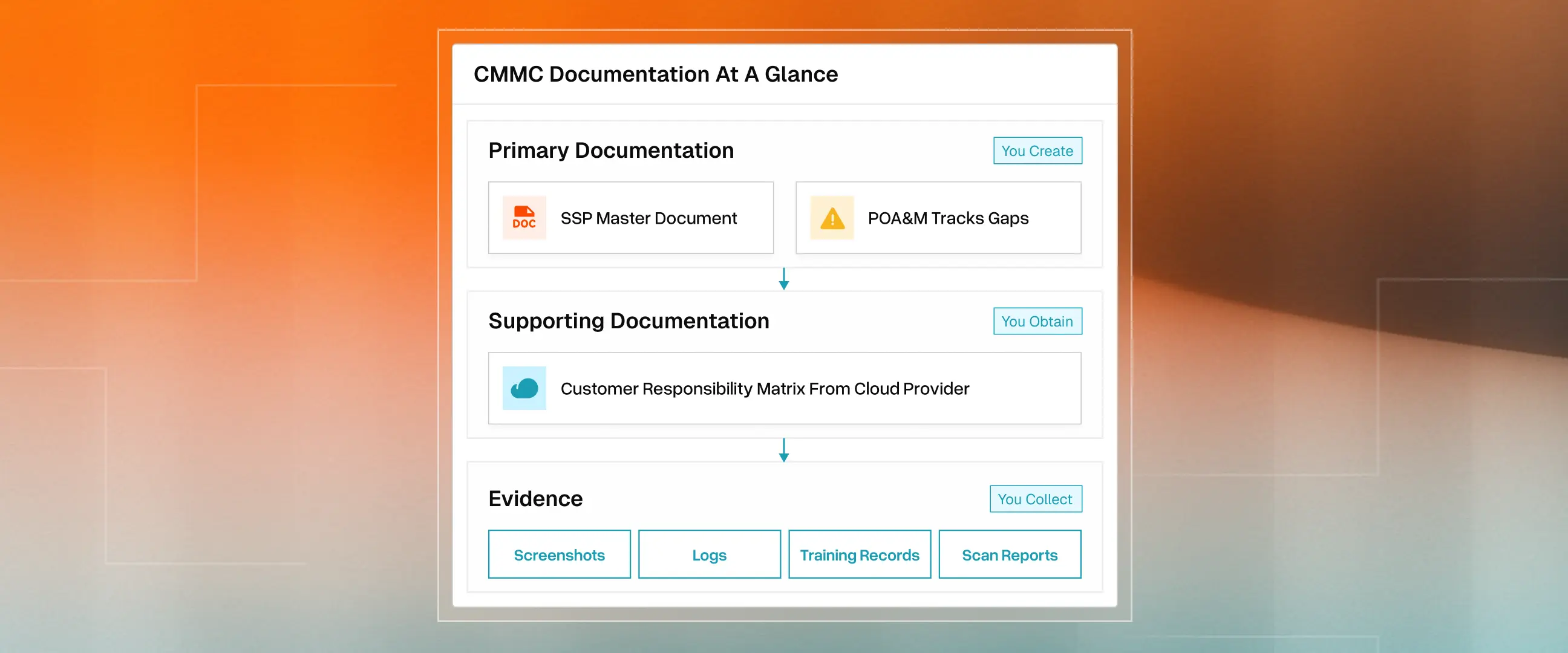
- CMMC Level 2 requires you to create two documents (System Security Plan and POA&M): You will obtain one document from cloud providers (Customer Responsibility Matrix), and collect evidence to prove that your controls work.
- Your SSP is the master document that covers your scope, asset inventory, network diagrams, security policies, and how you implement all 110 NIST 800-171 controls.
- The POA&M is separate because it tracks what you still need to do. You can't document gaps inside the document that claims compliance.
- If you use AWS, Azure, or Google Cloud, you need their Customer Responsibility Matrix to show which controls they own and which you own.
- You don't need fourteen separate policy documents. Most contractors embed policies directly in the SSP, and assessors will review them there.
- Evidence isn't a document you write. It's a proof package (screenshots, logs, training records, scan reports) that your controls actually work.
The documentation requirements for CMMC are simpler than most guides make them seem. Here's what you actually need:
- Primary CMMC Documentation Requirements
- System Security Plan (SSP)
- Plan of Action & Milestones (POA&M)
- Supporting CMMC Documentation Requirements
- Customer Responsibility Matrix from your cloud providers (if using AWS, Azure, Google Cloud, or managed service providers)
- Customer Responsibility Matrix from your cloud providers (if using AWS, Azure, Google Cloud, or managed service providers)
- Evidence Requirements
- Screenshots, logs, training records, and scan reports that prove your controls work
That's it. Two documents you write, one document you get from vendors, and the evidence you gather. This guide walks through each required CMMC document.
Primary Documentation Required for CMMC
The System Security Plan: Your Master Document
Your System Security Plan (SSP) is the owner's manual for your company's security. It explains what systems you have, how you protect them, and who's responsible.
According to the CMMC Level 2 Assessment Guide, assessors review the SSP first before examining anything else. CMMC Level 2 requires implementing 110 security controls from NIST SP 800-171. Your SSP documents how you've addressed each one.
First of all, “Define Your Scope!”
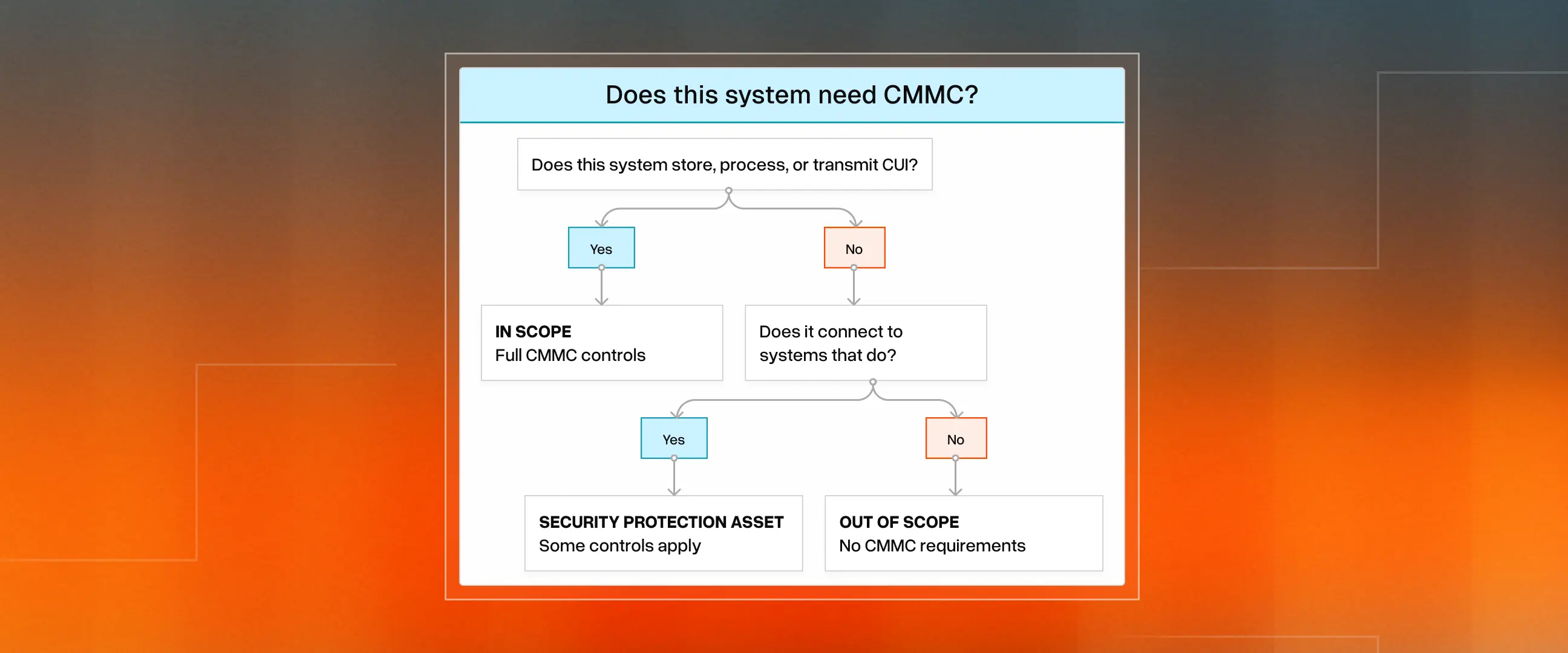
You don't have to certify your entire company. CMMC only applies to systems handling CUI. The CUI Registry lists all 125 categories of protected information. Smart scoping saves tens of thousands of dollars. If you isolate government work to specific systems, only those systems need CMMC controls.
The CMMC Level 2 Scoping Guide classifies assets into five categories: CUI Assets (systems handling sensitive data), Security Protection Assets (firewalls and security tools), Contractor Risk-Managed Assets, Specialised Assets, and Out-of-Scope Assets. Getting this right upfront makes everything else easier.
- Asset inventory: Every computer, server, and cloud service touching government data
- Network diagram: Visual map showing which systems are in scope and how they connect
- Data flow diagram: How CUI enters your company, moves through it, and leaves
- Boundary justification: Why each system is in or out of scope. Assessors will ask
What Else Goes in Your SSP
Policies and procedures can be standalone or embedded in SSP. Assessors may review the SSP for many practices rather than requiring separate documents.
- Security Policies: CMMC organises security into 14 domains. You need written policies for each. They're your company's official security rules. Your policies and procedures can reside within the SSP or in separate documents. Assessors will accept either approach.
- Your tech setup: Cloud providers (AWS, Azure, Google Cloud), software, and infrastructure.
- Control implementation: For all 110 controls, explain what you do (e.g., "We use Okta for MFA on all systems").
- Named owners: Actual people accountable for each security area. "Jane Smith, Head of Engineering", not "IT Department".
Here's what most founders miss: controls without named owners don't get done. Your SSP should say, "Jane Smith, Head of Engineering, is responsible for access control." The NIST Privacy Framework emphasizes accountability as foundational to any security program.
Table: Security Policies required under NIST 800-171 Rev.2
Each policy needs to include: who approved it, when it was last reviewed, and who it applies to. Plan annual reviews. Assessors check the dates.
Incident Response Plan: Your Breach Playbook
An incident response plan is a part of security policies, but requires special attention. If you work with the DoD and get hacked, you have precisely 72 hours to report it under DFARS 252.204-7012. Report through DIBNet to the DoD Cyber Crime Center (DC3). This isn't optional. It's a contractual requirement.
Your plan must cover
- Detection: What monitoring system do you have in place? Who gets alerted? Consider CISA's threat intelligence sharing.
- Containment: When you find a breach, how do you stop it from spreading?
- 72-hour reporting: Exact steps to report through DIBNet, including who has account access.
- Evidence preservation: Keep system images and logs for 90 days after an incident.
- Response team: Named people, not just job titles. Who does what when things go wrong?.
NIST SP 800-61 provides detailed guidance on building incident response capabilities. CMMC also requires testing your plan through tabletop exercises. Document what happened and what you learned. Assessors want to see that you've practiced, not just written a plan.
Plan of Action & Milestones (POA&M): The Fix-It List
Nobody's perfect, so the DoD allows a Plan of Action & Milestones (POA&M) to address gaps you haven't yet fixed.
If you score at least 80% on your assessment (88 of 110 controls), you can get "Conditional" certification. However, according to 32 CFR § 170.21, you have only 180 days to complete everything. Miss the deadline, and your certification expires.
Some things can't be deferred. The CMMC guide lists critical requirements like multi-factor authentication that must work on day one. Each POA&M item needs: the specific gap, why it exists, how you'll fix it, who's responsible, and when it'll be done.
POA&M Rules to Remember
- You need at least 80% of controls passing (88 of 110) to qualify for Conditional certification
- The 180-day clock starts when you get Conditional status, not when you write the plan
- Critical controls (like FIPS-validated encryption and MFA) cannot be deferred at all
- Missing the deadline means starting over with a new assessment
Supporting Documentation Required for CMMC
Using a FedRAMP-authorized cloud does not automatically make you CMMC compliant. This is one of the biggest misconceptions in defense contracting. CMMC has 320 assessment objectives across those 110 controls. When you use AWS GovCloud, Azure Government, or managed service providers, some objectives are handled by them, some by you, and some are shared. Without clear documentation, you may assume your cloud provider handles MFA enforcement when it's your responsibility. That assumption fails audits.
You need two documents.
- Customer Responsibility Matrix (CRM): A detailed document from your cloud provider mapping exactly which CMMC objectives they cover versus which you own. Think of it as the play-by-play plan. Request this in writing from every provider touching CUI.
- Shared Responsibility Matrix (SRM): The big-picture framework showing how responsibilities are split between you and ALL external providers. If you use multiple providers, the SRM shows how the 320 objectives are distributed across them. Your SSP must reflect this per NIST SP 800-171 requirement 3.12.4.
During assessments, assessors will ask: "Who is responsible for this control?" If you can't show documented proof, you own it by default. Verify providers through the FedRAMP Marketplace. For non-FedRAMP providers, verify they meet FedRAMP Moderate equivalent requirements per DFARS 252.204-7012. Get these documents before your assessment, not during.
Evidence: Proving You Do What You Say
Documentation says what you're supposed to do. Evidence proves you actually do it. The NIST SP 800-171A assessment guide details what assessors examine for each control.
Common Evidence Types
- Access Control: Screenshots of user lists, MFA settings from NIST 800-63B compliant authenticators, and permission assignments.
- Audit Logging: Log exports showing audit trail retention, SIEM dashboard screenshots.
- Training: Completion reports, course screenshots, and signed security acknowledgement forms.
- Vulnerability Scanning: Scan reports, remediation tickets, patching records
- Configuration: Baseline settings, exports, change management tickets, and hardening documentation
Important: Evidence must be current and dated within the assessment period. A screenshot from six months ago doesn't prove the control works today. Build evidence collection into regular operations, not just before an assessment.
Six Documentation Mistakes That Fail Assessments
- Generic templates without customization: Assessors spot copy-paste policies immediately
- Documents that don't match reality: Policy says "weekly scans", but you scan monthly? That's a finding for assessors.
- No named owners: "IT Department" isn't accountable. "Sarah Chen, IT Director" is.
- Stale evidence: Old screenshots suggest the control isn't maintained.
- Scope creep: Failing to separate government work means your entire company might need certification.
- Missing cloud responsibility documentation: Assuming your cloud provider covers controls without a CRM to prove it.
CMMC documentation doesn't have to be a six-month nightmare. Delve automates evidence collection, generates policies based on your actual setup, and keeps your SSP current as your systems change. Talk to our team about getting CMMC-ready.
About the authors
.webp)




Don't let manual compliance slow you down.